Cloud SaaS platform · Unlimited users · Worldwide
From the stockroom to the service bay. One connected business.
Tyresoftware is a cloud-based Software as a Service (SaaS) platform that brings inventory, barcode sales, service jobs and warranty claims together for tyre dealers, alignment workshops and automotive service centres in every country.
For product sales, service work—or both
Run a specialist tyre dealership, a service-focused workshop or a business that combines the two. Your services belong alongside your products.
Tyre dealers
Manage procurement, specifications, individual tyre identities, branch stock, invoices and warranty follow-up.
Alignment & service centres
Organise customers, vehicles, job cards, technician assignments, service charges and billing.
Multi-branch businesses
Keep branch stock and user access organised while managing dealership and workshop operations together.
Built in India. Designed for businesses worldwide.
Your country is part of your setup. Configure the business geography, country-linked operating currency and applicable tax rules before live billing.
Country-based setup
Country and regional reference data provide the foundation for business, branch, customer and supplier configuration.
Country-linked currencies
The currency catalogue includes USD, EUR, GBP, AED, INR and many more. Sales use the currency linked to the branch’s country.
This does not imply automatic exchange conversion or arbitrary foreign-currency invoicing from the same branch.
Configurable tax systems
Country tax systems, jurisdictions, classifications, effective-dated rates and tax components provide a foundation for local tax setup.
VAT, GST or sales-tax requirements need country-specific configuration and validation.
Confirm local readiness during onboarding
India GST is configured today. For another country, we review and configure the required tax rules and invoice requirements before live billing. Statutory filing, e-invoicing and other local integrations must be confirmed separately for your country.
Barcode identity across inventory, sales and warranty
A product barcode identifies the product. An individual inventory barcode identifies one serialized tyre. Use the right identity throughout its journey.
Inventory labels & print history
- Permanent inventory barcodes for serialized units.
- Reuse suitable product identifiers or create internal product codes when enabled.
- Select branch or received stock and preview label PDFs.
- Shared label sizes, including A4 sheets and compact barcode layouts.
- Print history, reprints and physical-print confirmation.
Scan to select a sales item
- Scan a registered product barcode or individual tyre label.
- Resolve the product and individual unit where available.
- Check branch stock and avoid adding the same serialized tyre twice.
- Review quantity, price and item details.
- Save the item and scan the next; complete the invoice normally.
Scan through warranty claims
- Select a customer’s sold tyre by inventory barcode or serial.
- Find existing claims for an individual tyre.
- Record dispatches, manufacturer responses and claim progress.
- Scan an available replacement tyre for settlement.
- Keep purchase and serial details for external purchases.
Printing uses a PDF and an installed printer driver; native ZPL or TSPL support is not required. Use matching label stock and a compatible keyboard-input scanner. QR labels require a QR-capable reader. Test the exact printer, label size and scanner together.
Your workshop has a place here
Service centres can organise the work that happens around the vehicle, alongside any tyres, parts or consumables sold.
Receive the vehicle
Keep customer and vehicle details connected to the job.
Plan and track the work
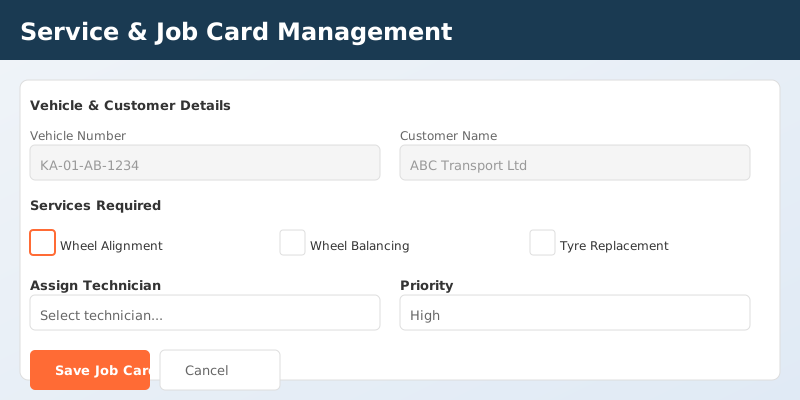
Create job cards, record services, assign technicians and follow progress.
Bill products and services together
Bring workshop charges and product items into the sales workflow, with configured tax components and payment tracking.
One SaaS platform. Your team. Your login rules.
Give every team member their own account, with no limit on the number of users. Manage access as people join, move between roles or leave your business.
Cloud-based SaaS
Use the software through the Tyresoftware website with a subscription. Your shop does not need to install and maintain its own application server.
Unlimited team members
Create individual staff accounts without a user-count limit. Assign branch access and roles to suit each person’s responsibilities.
Per-user login policies
Choose who can log in from anywhere and who must log in from the office. Owners and travelling staff can have different policies from office-based staff.
Office geofencing
For office-only users, check the login location against the configured office radius. Browser location permission is needed for these location checks.
Static IP address verification
When additional login security and office static public IP addresses are configured, office-only users must pass both the location check and the office IP check.
QR code login
After username and password verification, accounts requiring branch QR authentication complete login by scanning a time-limited QR code with an approved branch authenticator.
Manage access yourself
Authorized owners and managers can activate or deactivate team members and change their passwords from team management, without contacting support for routine staff changes.
Login policies apply per user; role and branch permissions control available actions after login. Office restrictions need the relevant branch setup. QR authentication requires an approved branch authenticator; applicable location and IP checks still apply. Geofencing and IP checks verify login conditions rather than continuously tracking staff location.
The rest of your business stays connected
Procurement & receiving
Manage suppliers, purchase orders, goods receipts and stock arriving into your branches.
Stock & branch operations
Track quantities, serials and stock locations, and manage stock movement between branches.
Customers & vehicles
Keep customer details, vehicles, purchase history and warranty context accessible during daily work.
Billing, accounts & payments
Manage product and service invoices, receipts, outstanding balances, expenses and accounting records.
Reports & access control
Review operational reports and give staff access according to their role and branch.
Practical help inside the website
The Tyresoftware Wiki explains printer and scanner setup, label selection, sales scanning and warranty scanning with topic-based guides.
Available modules and actions depend on your subscription, enabled configuration and staff permissions.
Bring your country. Bring your way of working.
Tell us whether you run a tyre dealership, a service centre or both, along with your country, currency, branches and tax requirements. We’ll confirm the setup needed before you start live billing.